|
1
|
From the side menu, select Charges > Edit Summary Batch or Charges > Edit Detail Batch. The Charge Batch filter appears.
|
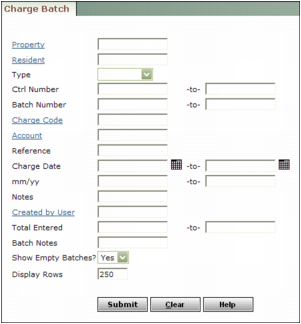
Property Type or select a property code.
Resident Type or select a resident code.
Type Select whether the charge batch is for residents, owners, vendors, or customers.
Ctrl Number Type or select a control number or range of control numbers.
Batch Number Type or select a batch number or range of batch numbers.
Charge Code Type or select a charge code.
Account Type or select a G/L account number.
Reference Type text from the charge Reference field.
Charge Date Type or select a date or range of dates.
mm/yy Type a month or range of months.
Notes Type text from the Remarks field for a line item.
Created by User Type or select a user code.
Total Entered Type an amount or range of amounts.
Batch Notes Type text from the Notes field for the batch.
Show Empty Batches Select whether you want Voyager to display the links for empty batches in the list of batches that match the search criteria.
|
3
|
Click Submit. The Charge Batch screen appears. If the search criteria matched more than one batch, a list of batches appears on the left. Make sure the batch that you want to post appears in the main part of the screen.
|
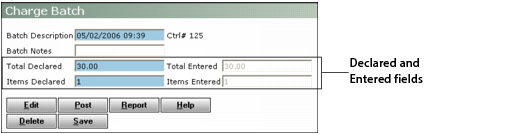
The Declared and Entered fields must match before you can proceed. If they do not match, you must modify the amounts in the Declared fields or edit charges in the batch.
|
4
|
Click Report. The Unposted Charge Batch report appears.
|

|
6
|
|
7
|
When asked to confirm that you want to post, click OK. Voyager posts the batch and displays confirmation.
|